Welcome Dear Educators,
In today’s episode, we are going into details on Hardware Considerations for implementing Virtual Reality (VR) in education.

HARDWARE CONSIDERATIONS FOR VIRTUAL REALITY IN EDUCATION
- VR Headsets:
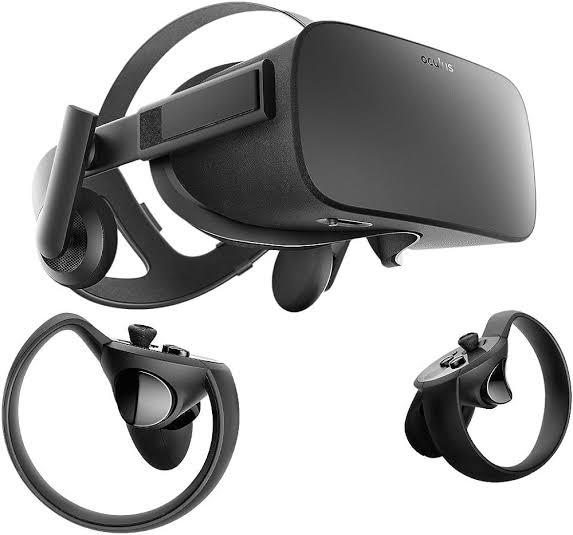
- Tethered vs. Untethered: Tethered headsets, like the Oculus Rift or HTC Vive, require a connection to a computer, providing high-quality graphics. Untethered headsets, such as the Oculus Quest or standalone devices, offer more mobility but may have slightly lower graphical capabilities.
- Compatibility: Ensure that the VR headset is compatible with the software and educational content planned for use. Verify the compatibility with platforms like Oculus, SteamVR, or any specific educational software.
- Comfort and Adjustability: Prioritize comfort and adjustability, as students will likely wear the headsets for extended periods. Look for features like adjustable straps, cushioning, and ergonomic designs to ensure a comfortable experience for users.
- 2. Controllers:
- Interaction: Consider the level of interactivity required for educational experiences. Hand controllers provide a more immersive experience and are suitable for activities like virtual experiments or art creation. Simpler controllers or gaze-based interactions may be sufficient for more straightforward content.
- Ease of Use: Opt for controllers that are intuitive and easy to use, especially for younger students. Simple button layouts and ergonomic designs can enhance the overall usability of the VR system.
- 3. Tracking Systems:
- Inside-out vs. Outside-in Tracking: Inside-out tracking systems, where sensors are integrated into the headset, offer greater mobility without external sensors. Outside-in tracking relies on external sensors, providing more precise tracking but requiring additional setup.
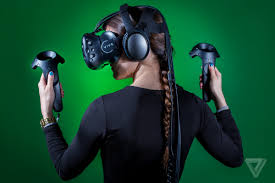
- Room Scale vs. Seated Experiences: Determine whether the educational content requires students to move around in a physical space (room-scale) or if seated experiences are sufficient. Room-scale experiences offer more interaction but may require more significant space.
- 4. Computing Devices:
- System Requirements: Check the minimum system requirements for the VR content, and ensure that the computers or laptops in the educational environment meet or exceed those specifications. VR-ready computers with powerful graphics cards are crucial for delivering a smooth experience.
- Graphics Cards and Processing Power: High-quality graphics cards and ample processing power are essential for rendering detailed VR environments. Consider upgrading existing hardware or investing in new computers that can handle the demands of VR content.
- 5. Accessories:
- Charging Stations: If using untethered VR devices, implement charging stations to ensure that the devices are always ready for use. Consider having extra batteries or charging cables available to minimize downtime.
- Protective Covers and Cases: To prolong the lifespan of VR hardware, invest in protective covers or cases. This is particularly important in educational settings where devices may be shared among students, increasing the risk of wear and tear.
- 6. Safety Considerations:
- Health and Safety Features: Look for VR systems that prioritize user safety. Adjustable interpupillary distance (IPD) settings accommodate different eye distances, reducing eye strain. Ensure that the hardware complies with safety standards to protect users from potential health issues.
- Hygiene Solutions: In shared environments, consider hygiene solutions to maintain cleanliness. Removable and cleanable face cushions or disposable covers can help prevent the spread of germs and ensure a more hygienic VR experience.
- 7. Budget and Scalability:
- Total Cost of Ownership (TCO): Consider the overall cost of implementing VR in education. Calculate the total cost of ownership, including hardware, software, accessories, maintenance, and potential future upgrades. Ensure that the chosen solution aligns with the budgetary constraints of the institution.
- Scalability: Choose a VR solution that aligns with scalability goals. Determine whether the hardware can be easily expanded or replicated as the VR program grows, and factor in costs associated with scaling up.
- 8. Technical Support and Warranty:
- Vendor Support: Opt for hardware from reputable vendors that offer reliable technical support. Check if the vendor provides regular updates, troubleshooting resources, and a responsive customer support system.
- Warranty: Verify the warranty options provided with the VR hardware. A comprehensive warranty can be crucial in educational settings where devices are subject to heavy usage. Consider extended warranty options for added peace of mind.
By addressing these considerations, educational institutions can make informed decisions when selecting VR hardware, ensuring a successful integration of immersive technology into the learning environment. A thoughtful approach to hardware choices contributes to a positive and effective VR learning experience for students and educators alike.
We shall go into more details tomorrow by looking at specific VR headsets and the features. Stay tuned!
Teacher Funke Akpan
Technology Integration Expert,
Topflighters Academy


 EduPlus